Search This Blog

Showing posts with label Game Assets. Show all posts

Tuesday, June 24, 2025

Endless Model Ripping Shenanagins

Now as you may know from some old posts, I really love ripping 3D models from games, well...

Here we are.


Grave Clobber is the first Skylanders Imaginators model ripped, uploaded June 20, 2024
Doom Stone is the last Skylanders Imaginators model ripped, uploaded May 7 2025

Yeah you read that right, a 10 month timeframe just to rip every Skylander. In all fairness when I did my first Skylanders batch it was small and I quit for a few months to work on other games...


(Said 'other games'. Neopets: The Darkest Faerie, and Prey the Stars)

After I worked on a few other projects I came back to Skylanders Imaginators back in December.

Chop Chop, uploaded December 13 2024

To be honest when uploading the Skylanders I did it in a completely random order, just uploading whichever ones I wanted. Though all the swappers I did last (except for Free Ranger) because they're such a pain to work with. They keep their parts in separate files.. 

Ex: Free Ranger is stored as

  • legs_stormbird
  • body_stormbird

Which is annoying to deal with. It means I have to extract two separate files, run them through my scripts, stitch them together in one folder... You get the point.

Two files, two sets of textures to extract too, which is such a huge pain since I have to do a lot of the texture stuff manually, which honestly I think was the longest part of my model ripping process. Though I feel like the singlehandedly worst model I've ever had to deal with in my life was Fake Crash.


Fake Crash, uploaded December 16 2024

He had... An absurd amount of textures. It still haunts me... In total, his final .zip file (before the split I'll talk about later) contained 34 textures.

There was also one, teeny tiny roadblock that came up during model ripping. And by "teeny tiny" I mean this took me several weeks to fix. You see, The Models Resource primarily accepts .DAE models. The problem with this, is that I didn't know that Blender didn't automatically make paths relative. For those reading this that don't know what a relative path is, basically when you open up a model, you want all of your textures to be applied to it already, right?

What you're supposed to have in the file would be:

  • Texture.png
But what Blender thought would be funny to do, with no way to automatically do this whatsoever, would be to have all of my textures be stored like this:
  • /D:/MySkylandersFolder/I have a ton of folders here lol/more text to illustrate how bad I am at organizing folders/ColorMap,textures@!actors!Skylanders!Character_C`tga,111out.png
Which. I feel like shaved years off of my life actually. The ONLY way I could fix this, would be to manually open the .DAE in a notepad editor, find the texture path, and correct it by deleting all of the folder names at the start. Oh, and by the way, that also didn't fully work. Because of all the absurd characters in Skylanders texture names. I would have to take ColorMap,textures@!actors!Skylanders!character_C`tga,111out.png and shorten it down to character_C.png which also couldn't be automated in any way, so I had to go through about 60 finished rips at the time, and manually change, every. single. texture name. And I had to go through every single model, every prop, every weapon, every effect, and manually change the texture name in the files there too.

Also, from that point on, I had to make renaming every texture a habit while ripping models.

And I did this, with every single model. Not to mention, textures wouldn't be automatically applied to each model either! I had to manually look at, and apply the appropriate textures to every single model I ripped. Ripping one Skylander would take be about 20 to 30 minutes. Multiply this by 181 and you get...

Well, I averaged it to about 25 minutes per model, and that brings us to 4,525 minutes, or in better terms, about 76 hours of my life was spent in total working on Skylanders models alone. Not including me fixing the texture paths, and not including the split.

I wish I could tell you I stopped there, I really wish I could. But at this point, this has gotten personal, this game hates me. Imaginators truly hates me and I hate Imaginators. This was a war.


"Frog Man" rip, uploaded May 8 2025

That's right, I couldn't stop at just ripping every Skylander, could I? No, this was a war I couldn't win, but I scrambled anyways, I fought till my last breath, and what did I get from it?

Nothing, actually. It's not like The Models Resource gives you anything for uploading models. This was all technically pointless. But honestly I did it cause I wanted to. Cause who's gonna stop me? Activision?

Legal disclaimer if you are Activision please do not DMCA me, this is not an invitation and for all intensive purposes, is a joke.


Well. While writing this post I ran into a... mild issue. It turns out I needed to split the composite maps into multiple textures. Which I was never told about beforehand, and had never been an issue in the past. I will now probably have to spend a month of work again just to rezip. Every. Single. Model.

...Again.

After a while of arguing talking with the staff, they eventually allowed me a compromise that I still have to split all the composites, but I'm allowed to keep the original files in-tact.

As of the time of writing this post, Grave Clobber and Flarewolf are already available for use! Since they were the very first two I worked on.

So if you ever wanted to mess around with Skylanders models... Well they're there now, go nuts. Make my effort worth it. Go forth and make cool junk B)

Tuesday, April 30, 2024

Skylanders Superchargers and how the models work

To all the potential tech and 3D model nerds scrolling my page, or if you've stumbled upon my Skylanders rips online, (which haven't been approved to The Models Resource yet at the time of writing this) I've decided to make a post explaining Skylanders Superchargers models and how to properly set up the nodes in Blender! This probably works for the models from other games but I haven't gotten around to ripping those apart yet.

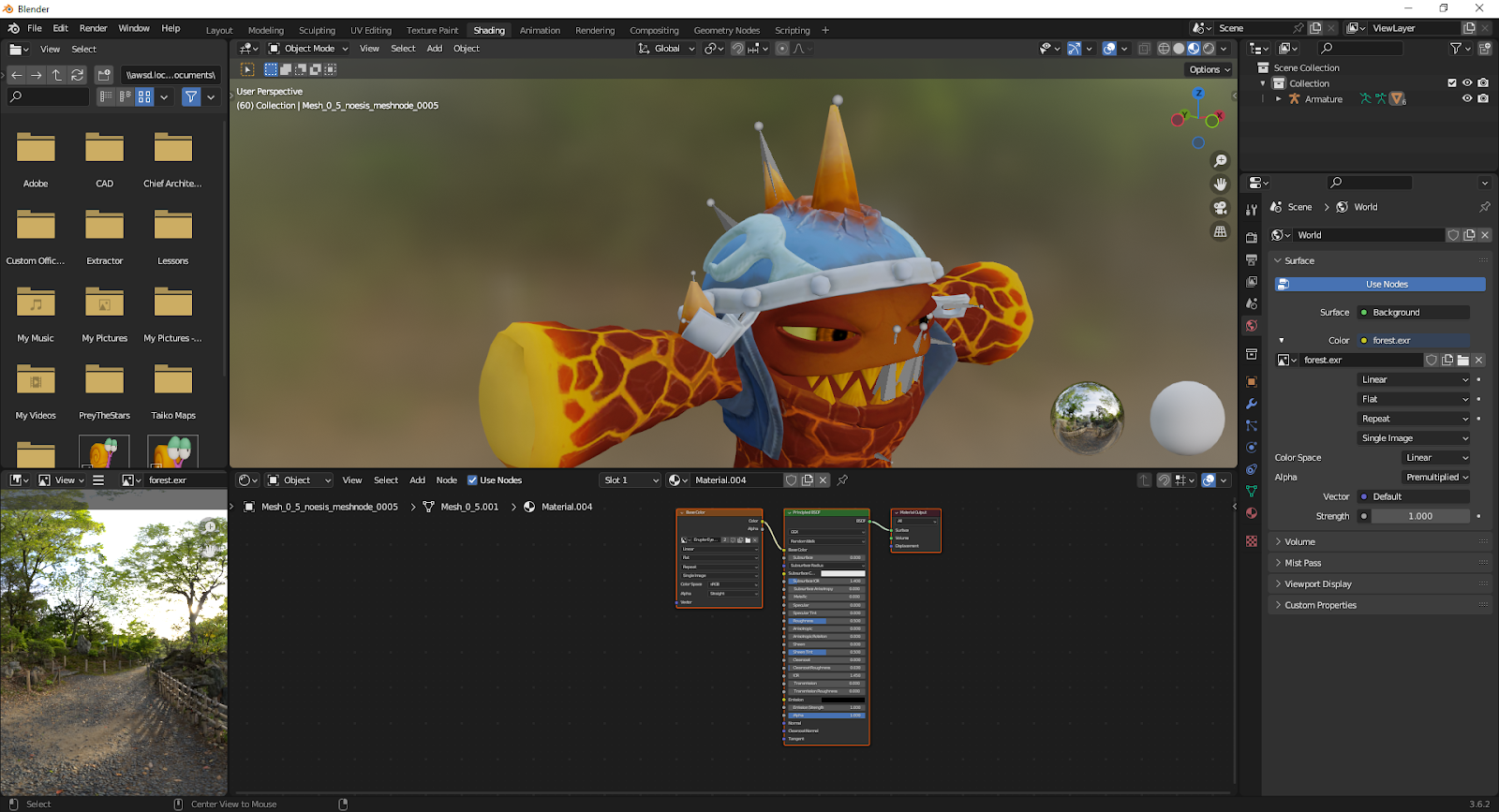
Blender Render of Lava Lance Eruptor with a basic lighting setup

For this particular instance I'm going to be using the WiiU models that I ripped. And I'm going to be using Eruptor since he is a good instance for having all of the textures I need to cover.

First thing's first, import the DAE of the Skylander you're using (yes, this tutorial is for beginners too) and you might have a fully textured model already. If it doesn't have textures already hooked up then... oops. First thing might look nice already but it doesn't have any of the extras plugged in, you're going to have to do that yourself.

No extra textures plugged in yet...

And the Shading tab in the top of the screen is where most of our work will be carried out.


As you can see, those blocks below are nodes, and that large green one is where everything will be plugged into. Add more image texture blocks and find the textures that correspond to your part.

These are the textures we are using, in reading order we have the Color, Composite, Normal, and Emissive maps

Just plugging these in directly won't do much, a lot of these have prior setup required. Let's start off with the composite since there isn't too much difference from adding it unless it's a metallic prop.
Add a Separate Color node and connect the composite, and plug the green channel to specular and the blue channel to metallic. One of the more simple node setups. 

Now for the emissive:
Plugging in the emissive right now won't look correct, you have to add a color mix node.


Add a color mix node and place it with your regular body color and emissive texture. Connect the emissive to channel B and connect your regular body to channel A. (Don't disconnect your color from the base color! One texture can connect to multiple nodes.)
Now set your color mix node to Multiply and the factor to 1.000 and now the result good for plugging in! You can adjust the emission strength to your liking for however bright you want the lava to be.

Now for the normals which are the most important texture, even if you don't want the other textures, I would recommend adding the normal map. Skylanders has a strange problem with normals where the red channel is inverted, but luckily Blender can fix it no problem with one extra step! To fix the normals add a RGB Color Curve node and plug in the normal, flip the red channel in a straight line.
(Click to enlarge the images if you need to understand this step better)

Now add a Normal Map node from the vector node section and plug the curve output into that node. The normal can now be properly plugged in!
Before and After adding the nodes

Have fun messing with your models now!

Friday, January 26, 2024

Model Ripping Post??? Again?!

 So currently I'm still working on the last of the Ring of Heroes rips, fixing them to be uploaded online, and now I have over doubled the previous page! With 86 pending models, tons of Skylanders and Enemies pending now, a quick compressed list here:

(all alphabetized)

The full pending list

Barbella

Bomb Shell

Bone Chompy

Boomer

Brawl'N'Chain

Brawlrus

Broccoli Guy

BruiserCruiser

Buzzer Beak

Chain Reaction

Chill

Chomp Chest

Chompy Mage

Chopper

Chopscotch

Cyclops Grunt (Evolved)

Cyclops Mage

Cyclops Mage (Evolved)

Cyclops Queen

Cyclops Warrior

Cyclops Warrior (Evolved)

Cynder

Dark King Pen

Dark Spyro

DejaVu

Destroyer (Dark)

Destroyer (Earth)

Destroyer (Fire)

Destroyer (Life)

Destroyer (Light)

Destroyer (Tech)

Destroyer (Undead)

Destroyer (Water)

DinoRang

Dreamcatcher

Drobot

Ember

Eruptor

Eye Scream

Fisticuffs

Flare Wolf

Flashwing

Fling Kong

Foodfight

Freeze Blade

Gearshift

Giant Chompy (Chompy Mage)

Golden Queen

Grilla Drilla

Gusto

Headrush

Hex

High Volt

Hot Dog

Jet Vac

Ka-Boom

Kaos

Kaos (Ultra Traptanium Kaos)

Knight Light

Knight Mare

Krankenstein

Light Flashwing

Light Hex

Lightning Rod

Lob Goblin

Lob Goblin (Club)

Lob Goblin (Evilized)

Mags

Master Eon (Head)

Ninjini

Pain-Yatta

Pit Boss

Roller Brawl

Ruin Guardian

Sheep Creep

Slam Bam

Smolderdash

Snapshot

Sprocket

Taekwon Crow

Tidepool

Tree-Rex

Tuff Luck

Wash Buckler

Watcher Stone

Wildfire

Thursday, January 4, 2024

Skylanders Kiosk Demos

We have some Imaginators Kiosk demo files from the Skylanders Reverse Engineering community! I'm also linking them in the helpful links page for the sake of archiving them.

If you want to check out these files here's the link!

But if you don't want to dig through them, I'll overview them here.


Here's the 'Attract' file, the standard video that loops on the kiosk in most circumstances.
Most of the files from the kiosks are videos, with a few extra tidbits of code included for the sake of archiving the exact files.

Ro-Bow's kiosk video file

Imagine being lucky enough to see this in stores, I can only dream... Luckily I pride myself on being a proud Ro-Bow owner, though enough of my bragging and back to the rest of the rundown. Also, these videos showcase the Imaginators themselves alongside the senseis, alongside their special item unlocks.

Even Skylanders that weren't released physically in stores like Chompy Mage have video files. Though the Giants and originals are missing entirely. Probably because they weren't being sold in stores at that point? Though I can't recall since I actually never bought any senseis in-store when I was younger. 

The ERROR1.AVI is a copy of ATTRACT.AVI this time, unlike other kiosk files where the error file is its own unique video, usually just black text on a red background telling you to plug in a portal, it honestly looks like a cheesy creepypasta.

I couldn't find anything else of note while looking through these so if you do decide to look through them yourself please message me if you find more stuff of note!

Monday, December 18, 2023

Ring of Heroes rips

 Well I've been back onto fixing all of these models and uploading them, meanwhile fixing all of my old renders on the page- 

Here's a few renders of some upcoming rips while I'm at it!


To be honest I could gush about the Awakened designs for hours, I wish that they could be some cool figures or something... (*Cough cough*, Activision hire me- *Cough*)

And as you can see, or hopefully see, these renders are a lot cleaner than those of my previous batch and they really let the textures shine through. I have been changing my rendering over time as I've worked on other model ripping projects, so hopefully I can get around to cleaning up the old renders.

Like this one. Yikes-
I'll get around to you too Zoo Lou...

Tuesday, November 28, 2023

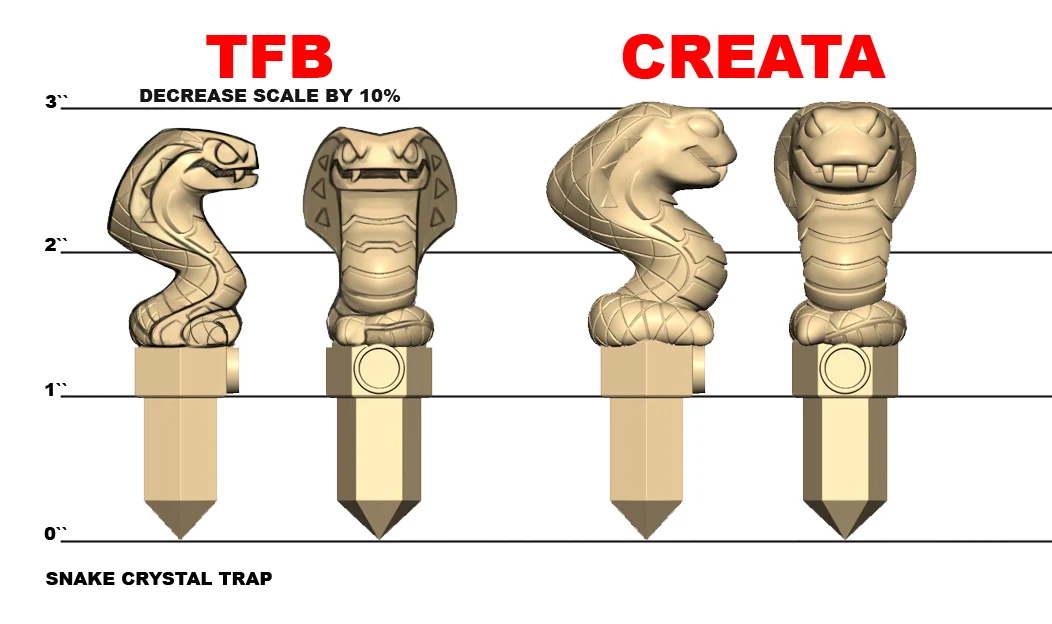
Jeff Murchie Skylanders Concepts Appreciation

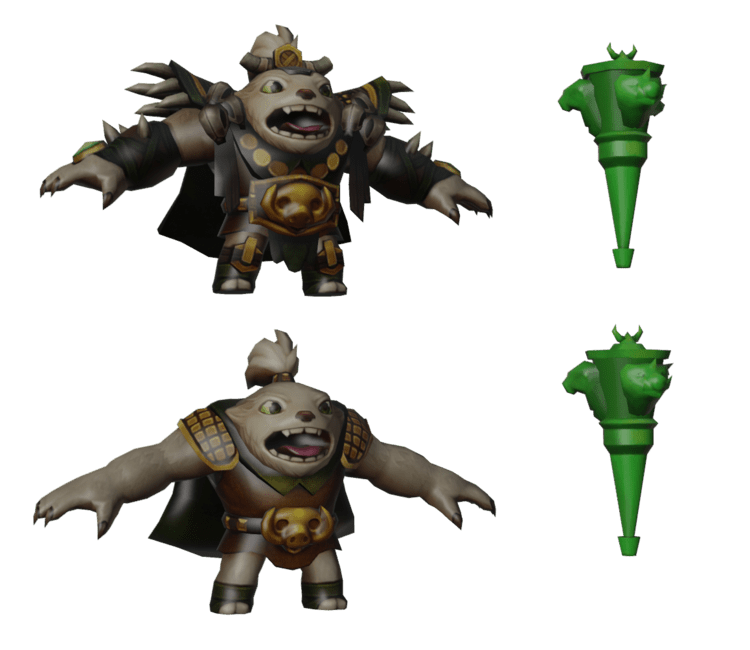
I think it's quite interesting to see how the artists worked on the models! It's also neat to use his work as reference to learn how to properly do markups. Since I also aspire to be a game developer I enjoy digging through what I can find of the productions and analyzing them to the best of my ability.


And it turns out the Jeff Murchie also worked on the toys as well! You can see how markups work here too. How I wish I could work at TFB someday...

Monday, November 27, 2023

Skylanders Model Ripping

 Welp, I finally have it. Thanks to help from JesseTheLamest (JesseTheCoolest in my opinion) who has run me through the steps and programs required to do this. My dreams of finally ripping Skylanders models have come true!


So my current project is to rip most models from Skylanders Superchargers and get that all uploaded online. And oh man does it take a long time to even get one model out there...

See you guys on the other side-
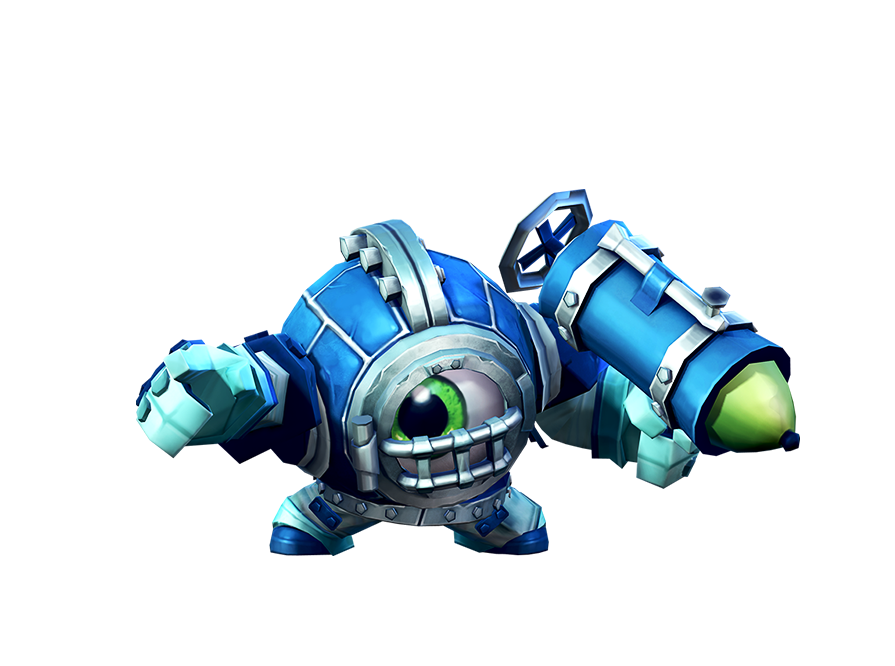
Spyro Dive-Clops